Connect DeckGym to ChatGPT and Claude
Connect DeckGym to your AI assistant and brainstorm decks together. Your assistant gets meta deck data and the full card catalog to work with. It's free, and you don't need a DeckGym account.
The DeckGym link
Every app below asks for this link. Copy it first.
https://www.deckgym.com/api/mcpChatGPT
- On a computer, open chatgpt.com/plugins and sign in.
- Click Add, then Add custom MCP server.
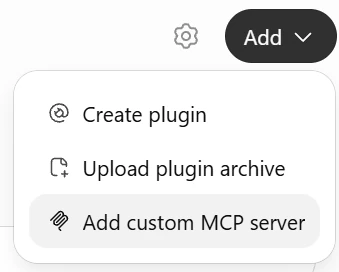
- Name it DeckGym. Under Connection, keep Server URL and paste the DeckGym link.
- Change Authentication from OAuth to No authentication.
- Tick I understand and want to continue, then click Create as a plugin.
- Install the plugin when ChatGPT offers it.
- Start a new chat, type @, pick DeckGym, and ask your question.
If you do not see Add custom MCP server, your ChatGPT plan or workspace does not allow custom servers yet.
Claude
- Open claude.ai (or the Claude app), open your account menu, and choose Settings.
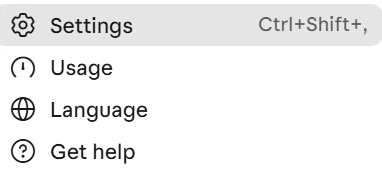
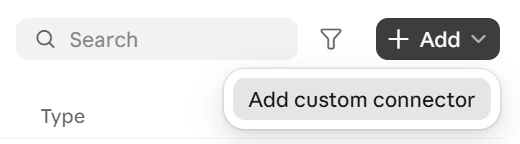
- On the Connectors tab, click Add, then Add custom connector.
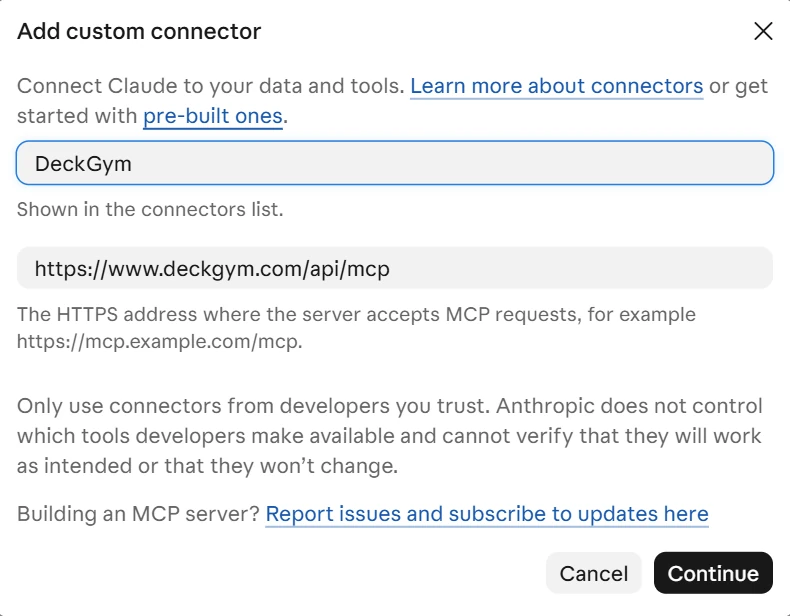
- Name it DeckGym, paste the DeckGym link into MCP server URL, and click Continue.
- Start a new chat and ask your question.
The free Claude plan allows one custom connector.
Things to ask
- See what's winning: “What's the best deck in Pokémon TCG Pocket right now?” “What are the top 5 decks this week?”
- Get a meta decklist: “Give me the best decklist for Mewtwo ex.” “Which cards are core and which are flexible in Giratina Darkrai?”
- Find decks for cards you own: “I just pulled Mega Altaria ex. What decks use it?” “Show me meta decks with Pikachu ex and Zapdos ex.”
- Look up cards: “What does Sabrina do?” “Which Supporter cards let you draw?”
- Build and improve decks: “Build me a Water deck around Greninja and give me the DeckGym link.” “Which 2 tech cards would make my Mewtwo deck better against the meta?”
Answers include DeckGym links. Open them to edit a deck, share it, or test it against the meta in the Optimizer, which runs in your browser.
Other apps
DeckGym works in any app that supports remote MCP servers over Streamable HTTP, with no authentication.
Claude Code
claude mcp add --transport http deckgym https://www.deckgym.com/api/mcp
Cursor
Add this to ~/.cursor/mcp.json:
{
  "mcpServers": {
    "deckgym": {
      "url": "https://www.deckgym.com/api/mcp"
    }
  }
}
VS Code
Add this to .vscode/mcp.json:
{
  "servers": {
    "deckgym": {
      "type": "http",
      "url": "https://www.deckgym.com/api/mcp"
    }
  }
}
Questions
- Does DeckGym see my chats? No. The assistant only sends DeckGym what a lookup needs, like a card name or a decklist.
- Can it change anything? No. It only reads public data and makes links. Nothing is saved until you open a link and save the deck yourself.
- Why does a card say it is not implemented? The Optimizer can only simulate cards DeckGym supports. The builder shows which ones are missing.